







Personnage IA
Nano Banana Pro
0/2000
1K
3:4
Type de Vue
Carte Modèle Créative
Pour des concepts stylisés et une exploration rapide.
Style
Réaliste
Réaliste
Tout
Ajouté
Non ajouté
Générez des personnages IA réutilisables et des influenceurs de marque
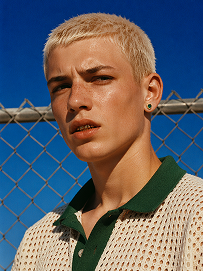
Outdoor bust portrait, cool teenage young man with short platinum blonde buzz cut, freckles across nose and cheeks, gold teeth grills on front teeth, single emerald green gem earring in left ear, sweat drop on cheek, wearing off-white open-knit polo shirt with dark green collar, standing in front of chain-link fence, vivid deep blue clear sky background, harsh bright midday direct sunlight, high contrast sharp shadows, 90s street fashion editorial photography, realistic skin texture, film grain, saturated vibrant color grading, shot on 35mm film, ultra detailed, 8K, sharp focus
Utiliser le prompt
Realistic treet portrait, handsome young man with fluffy dark curly hair, sitting cross-legged on a dark green outdoor metal bench on city sidewalk, big bright smile showing teeth, right hand raised gesturing as if chatting, wearing lime yellow crew neck sweatshirt, loose white casual trousers, white sneakers, modern urban building background with shallow depth of field, natural soft daylight, lifelike skin texture, casual lifestyle photography, shot on Canon R5, 50mm f/1.8 lens, sharp focus, 8K, ultra detailed, warm natural tone
Utiliser le prompt
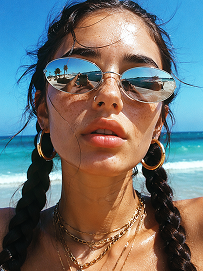
Close-up beach portrait, young woman with two thick dark long braids, freckles all over nose and cheeks, futuristic silver oval mirrored sunglasses reflecting beach scenery, large gold hoop earrings, layered multiple gold chain necklaces, slightly open mouth, bright harsh summer midday sunlight, clear turquoise ocean and blue sky background, wind blowing stray hair strands on face, realistic skin texture, sun-kissed complexion, vintage film grain, summer coastal fashion photography, sharp details, high saturation, shot on 35mm film, 8K ultra realistic
Utiliser le prompt

Construction Crew Headshots That Feel Real

Build believable construction worker portraits for crew bios, contractor pages, recruiting campaigns, and project proposals. Media.io helps you generate clean, professional AI headshots that match job-site credibility without a studio shoot. Create portraits that look consistent across your website, pitch decks, and safety materials.

Generate Construction Headshots

Tip: Use uniforms, hard hats, reflective vests, and neutral backgrounds for a trusted job-site look.

AI construction site supervisor headshot in a hard hat and high-visibility vest

Site Supervisor Profile Photo

Realistic carpenter portrait for a contractor bio page with a tool belt and workwear

Skilled Carpenter Crew Bio

Professional construction safety trainer headshot for onboarding and training materials

Safety Trainer Introduction

Confident construction project manager portrait for bid proposals and company decks

Project Manager Proposal Image

Friendly trade technician headshot for recruiting ads and hiring campaigns

Field Technician Recruiting Visual

Clean AI construction worker portrait for a company team directory and website bio

Crew Directory Headshot

Why Construction Teams Use Media.io

Construction brands need headshots that feel credible, uniform, and ready for business. A strong crew photo can support recruiting, project bids, safety training, and website team pages without the cost of a full photoshoot. Media.io makes it easy to keep the look consistent across office staff, field crews, and subcontractor profiles. You can generate polished visuals fast, then reuse them wherever your brand needs a human touch.

Built for Crew Credibility

Construction buyers want to see real people behind the company name. This generator helps you create portraits that look professional, practical, and job-site ready. Use them for team pages, project introductions, or company directories. The result feels more credible than generic stock imagery. It helps your crew appear established and dependable.

Useful Across Multiple Workflows

A single headshot can support many business needs. Use it in recruitment posts, contractor profiles, safety manuals, and proposal documents. That makes it easier to keep your brand consistent across channels. Instead of searching for different images each time, you can reuse one strong visual system. It is a simple way to save time on content production.

Fits Real Construction Branding

The best construction portraits usually show practical details like hard hats, high-visibility gear, and straightforward expressions. Media.io helps you guide the style toward a clean, commercial-friendly look. You can keep the image polished without making it feel overly staged. That balance works well for contractor pages and B2B marketing.

Fast Enough for Busy Teams

Many construction teams do not have time to organize a photo day for every new hire or project lead. With AI, you can create useful headshots much faster. That makes it easier to update bios, launch recruiting campaigns, or refresh your website before a deadline. The workflow stays simple for non-designers. You get a result that is quick, practical, and presentation-ready.

How to Create a Construction Worker Headshot

01

Choose the Role and Style

Start with the exact job role you want to represent, such as foreman, carpenter, safety trainer, or project manager. Pick details that match the use case, including a hard hat, vest, or clean work shirt. Keep the look practical so the portrait feels authentic for a construction setting.

02

Add the Use Case Context

Think about where the image will appear, such as a crew bio, proposal, recruiting ad, or training page. That context helps you choose the right expression and level of formality. A website profile may need a polished headshot, while a safety guide may benefit from a more instructional look.

03

Generate, Refine, and Reuse

Use Media.io to generate the portrait, then refine it until it matches your brand. Once you have the right look, reuse the same style across your team pages and marketing assets.

What Teams Say About the Results

user
Derek M.

Operations Manager

starstarstarstarstar

"Perfect For Crew Bios" We needed headshots for our crew page fast, and the result looked surprisingly credible. The portraits matched our job-site brand without feeling cheesy or generic. It saved us from scheduling a full photo session for every new hire. We now use the same style across our website and pitch materials. That consistency makes the company look much more organized.

user
Tanya R.

Construction Marketing Lead

starstarstarstarstar

"Better Than Random Stock Photos" Our proposal decks used to rely on stock images that never felt like our team. These AI headshots gave us a cleaner and more authentic look. They work well for contractor pages, case studies, and recruiting campaigns. The people in our materials now feel connected to our actual business. That has helped our presentations look far more credible.

user
Luis C.

Safety Training Coordinator

starstarstarstarstar

"Great For Training Materials" I needed professional-looking portraits for onboarding and safety documents. Media.io made it easy to create a look that felt serious but approachable. The hard hat and vest details helped the images fit the topic immediately. Our materials now look more polished and easier to trust.

user
Erin S.

Agency Producer

starstarstarstarstar

"Fast For Client Deliverables" We produce marketing content for trade clients, so turnaround matters. This generator helped us create construction worker visuals without waiting on a shoot. The outputs were useful for bios, banners, and project announcements. It also gave us a consistent style that clients could approve quickly. That efficiency is a big win on deadline-driven projects.

user
Marcus P.

Recruiting Specialist

starstarstarstarstar

"Helps Hiring Pages Feel Human" Our recruiting pages needed more personality, but we did not have enough current crew photos. The AI portraits gave each role a clearer and more professional presence. Candidates can now connect with the company faster when they see real-looking team visuals. The process was simple enough for our team to handle in-house. It made the whole hiring page feel more complete.

Construction brands are using AI portraits to speed up content production and keep crew visuals consistent across web, sales, and hiring channels.

Frequently Asked Questions

1. What is an AI construction worker headshot generator?
faqfaq

It is a tool that creates realistic construction worker portraits from text or style guidance. You can use it to make crew bios, contractor pages, recruiting visuals, and training images. The goal is to produce a professional look without needing a studio session. Media.io keeps the workflow simple for teams that need quick results.

Yes, construction headshots are a strong fit for contractor websites and team pages. They help visitors see who is behind the work and make the business feel more established. You can use them in staff directories, company bios, or project introductions. They also work well in proposal decks and service pages. A clean portrait can add trust before a prospect ever makes contact.

Yes, they work well for safety training, onboarding, and compliance documents. A hard hat, vest, and clear professional expression can make the image feel relevant to the topic. That helps the material look more purposeful and easier to follow. You can also create different roles for different training modules. It is a practical way to keep instructional visuals consistent.

You can create portraits for foremen, site supervisors, carpenters, electricians, project managers, safety trainers, and field technicians. The best results usually come from adding role-specific details to the prompt. That makes the image feel more authentic to the job and the audience. It also helps your visuals support the right page or campaign. You are not limited to one type of worker look.

Yes, you can guide the style toward formal, field-ready, or somewhere in between. A formal version may work best for executive bios or proposal documents. A field-ready version fits crew pages, recruiting ads, and job-site marketing. The difference often comes down to clothing, background, and expression. That flexibility makes it easier to match the image to the use case.

Not necessarily. You can begin with text prompts and style instructions that describe the role, clothing, and setting you want. If your workflow includes reference images, they can help shape a closer match. But many users start from scratch when they need a new portrait quickly. That makes the tool useful even when no crew photo is available.

Yes, and that is one of the biggest benefits. You can keep the same background, lighting, and portrait style across the whole crew for a unified look. That consistency helps team pages and proposal materials feel more professional. It also makes your brand easier to recognize across the site. A matching set of portraits can make a small team look more polished.

Yes, Media.io is built to support commercial-friendly creative workflows. That makes it a good fit for marketing teams, agencies, and contractors creating business-facing content. You can use the portraits for websites, recruiting campaigns, project decks, and internal resources. The key is to keep the visuals realistic and aligned with your brand.

Media.io Online AI Tools Quality Rating:
vote 4.7 (162,357 Votes)



