Seleccione / @ carácter, describa la escena que desea generar.
0/2000
9:16
1K
1
Modo Ilimitado Banana Pro
Creaciones
Centro de Ideas
Cómo funciona
Todo
Funciones populares
Ver todo
Desafío creativo de Halloween
Ver todo
Historia de Frutas con IA
Ver todo
Video de Historia de IA
Ver todo
Videos Virales Hoy
Ver todo
Videos de Productos de IA
Ver todo
Personaje de IA
Ver todo
Tendencias de Baile
Ver todo
GPT Image 2
Ver todo
Seedance 2.0
Ver todo
Emparejamiento de Celebridades con IA
Ver todo
Indicaciones de Poses para Parejas
Ver todo
Prompts de Poses de Chica AI Estética
Ver todo
Sugerencias de Pose Elegante para Chicos AI
Ver todo
Lista de generación
Tus creaciones solo se guardan durante 7 días. Los recursos creados después de actualizar a Membresía se almacenarán de forma permanente.
¡Desbloquea tu potencial creativo y experimenta la magia de Media AI ahora mismo!
Identificador de picaduras de insectos por foto para una comparación visual más rápida
Sube una foto clara de la piel y usa la guía del identificador de picaduras de insectos para comparar patrones de picaduras probables en segundos. Media.io te ayuda a identificar picaduras de insectos por imagen, revisar marcas de aspecto similar y consultar imágenes de identificación de picaduras de insectos para tomar decisiones más seguras sobre los próximos pasos sin depender únicamente de gráficos estáticos. Los creadores a menudo lo usan para tipos de picaduras de insectos.
Escribe tu idea -> La IA la diseña. Pruébalo gratis.
Revisa estas instrucciones de ejemplo y luego ajusta los detalles para obtener mejores resultados con el flujo de trabajo del identificador de picaduras de insectos por foto de Media.io. También puede ayudar a identificar diferentes picaduras de insectos.
Cuadrícula de picaduras etiquetadas
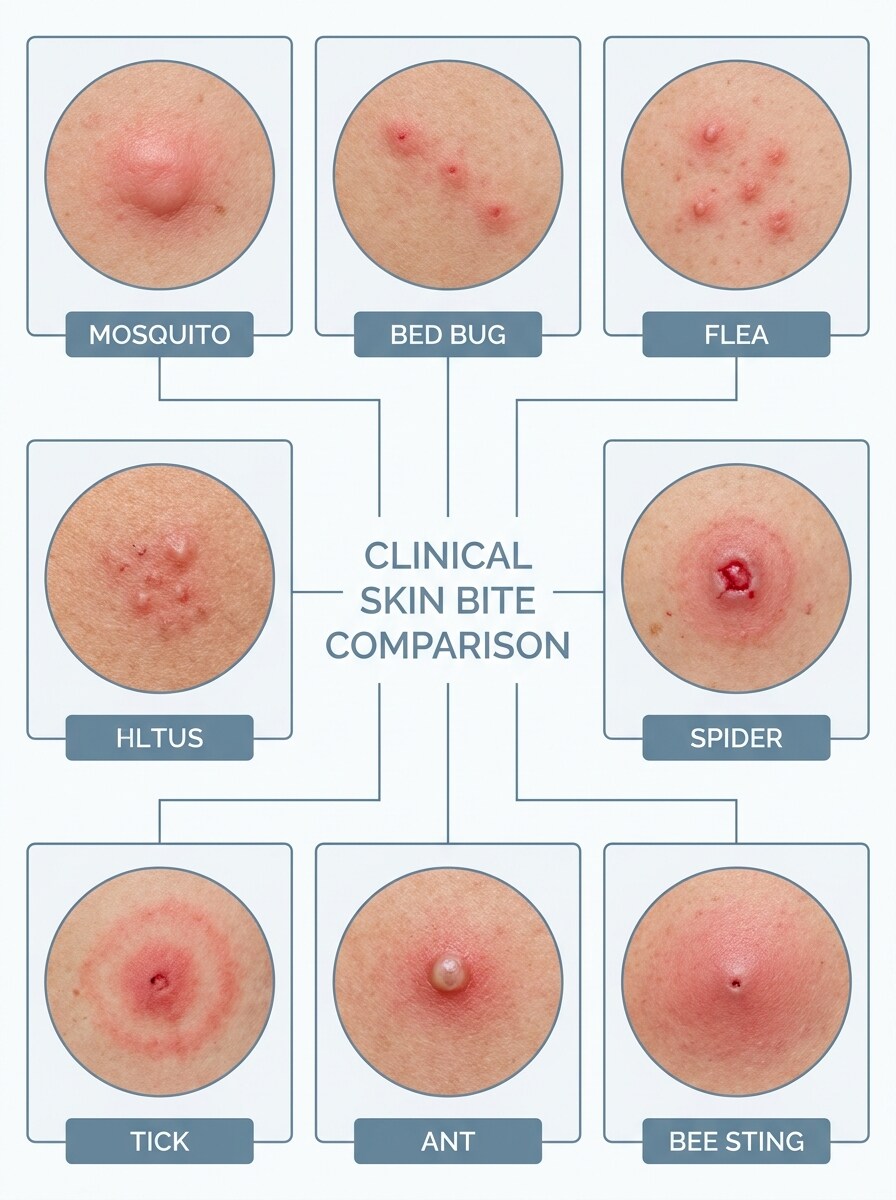
Usa la imagen subida como sujeto y transfórmala en una tarjeta de comparación médica limpia. Mantén el área de la picadura realista y colócala junto a ejemplos de referencia etiquetados para mosquito, chinche, pulga, araña, garrapata, hormiga y picadura de abeja, con tonos neutros, iluminación nítida, espaciado claro y estilo de infografía confiable.
Primer plano con superposición de síntomas
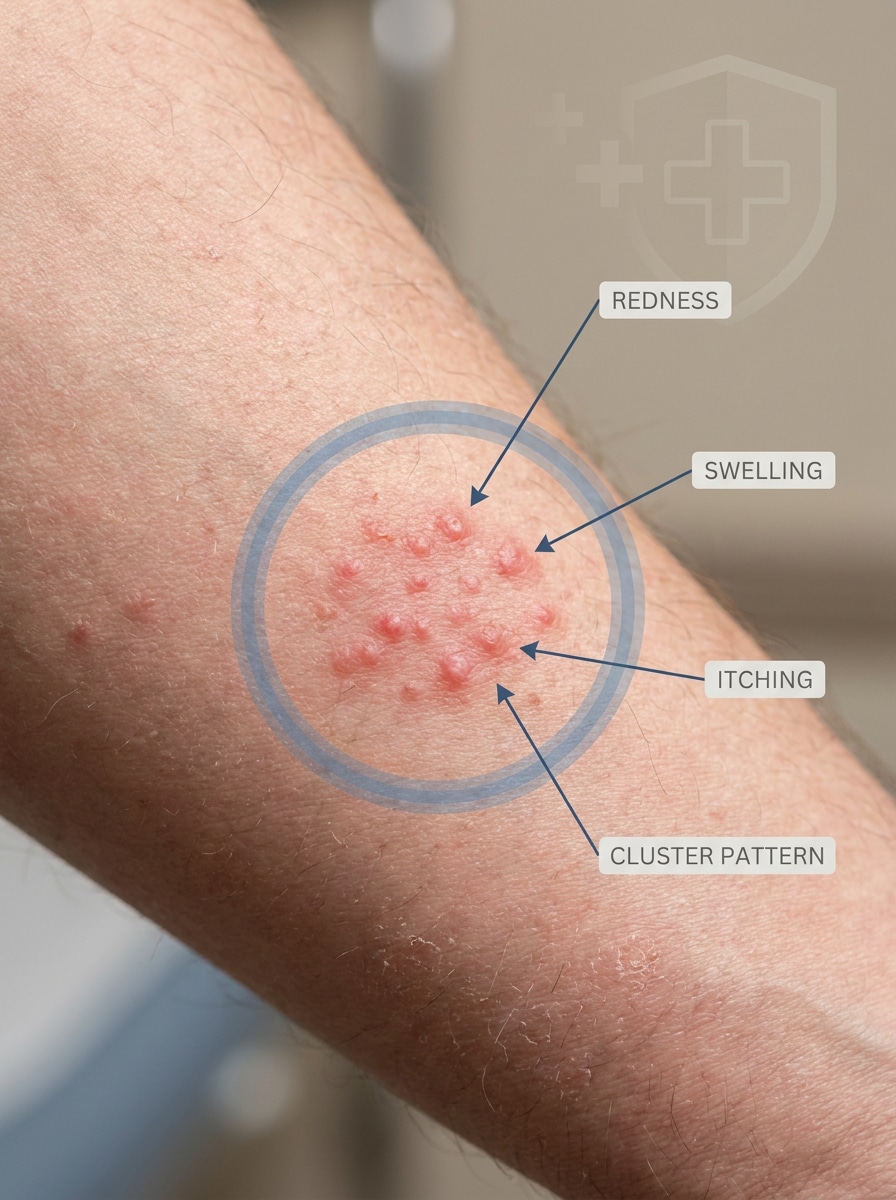
Usa la imagen subida como sujeto y conviértela en un primer plano macro realista de la piel con el área de la picadura suavemente marcada con un círculo. Agrega etiquetas de superposición mínimas como enrojecimiento, hinchazón, picazón o patrón de agrupación, manteniendo el detalle de la piel natural, la iluminación suave y el diseño explicativo médico calmado y preciso.
Analizador de fotos subidas
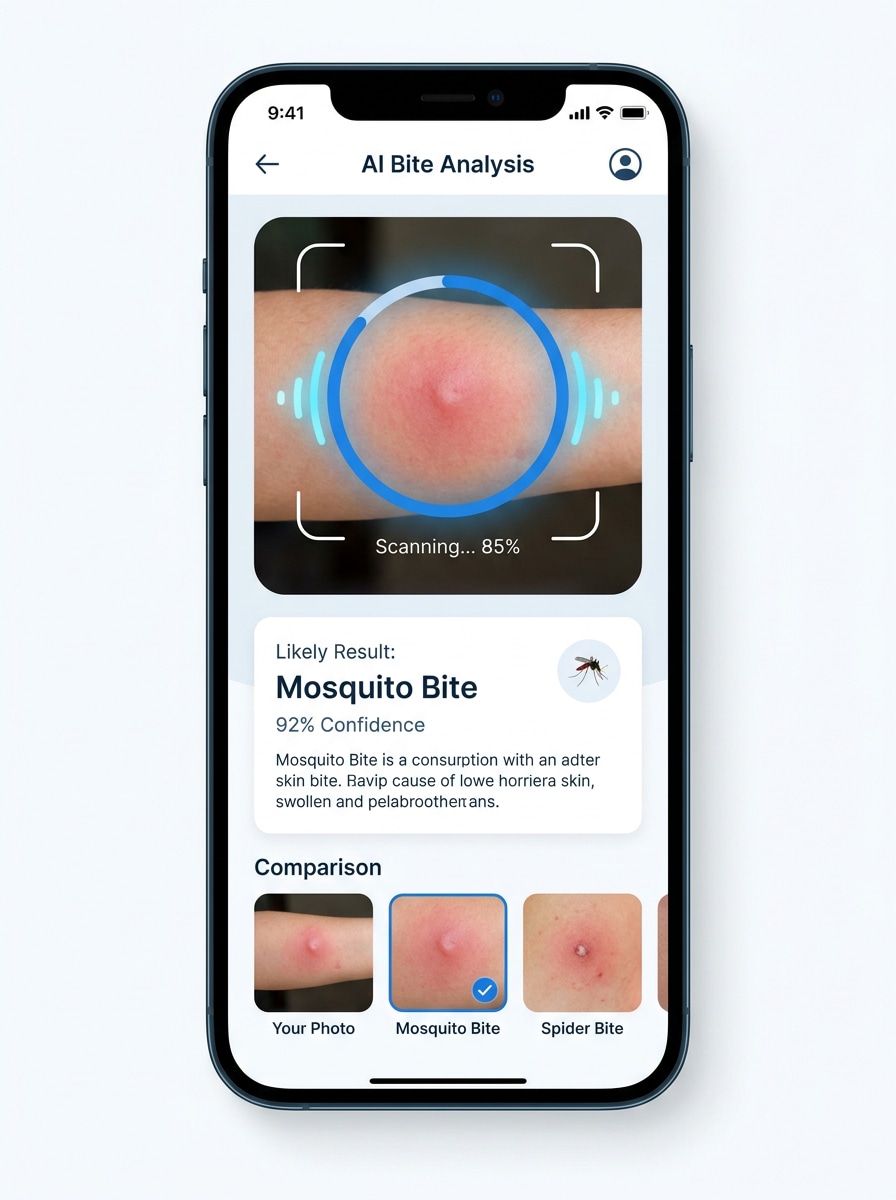
Usa la imagen subida como sujeto y preséntala dentro de una interfaz moderna de análisis móvil. Muestra la vista previa de la foto de la picadura, el progreso del análisis con IA, una tarjeta de coincidencia probable del insecto y señales de comparación visual simples, usando espacio en blanco limpio, acentos azules de tecnología sanitaria, jerarquía de interfaz clara y diseño de producto creíble.
Flujo previo al resultado
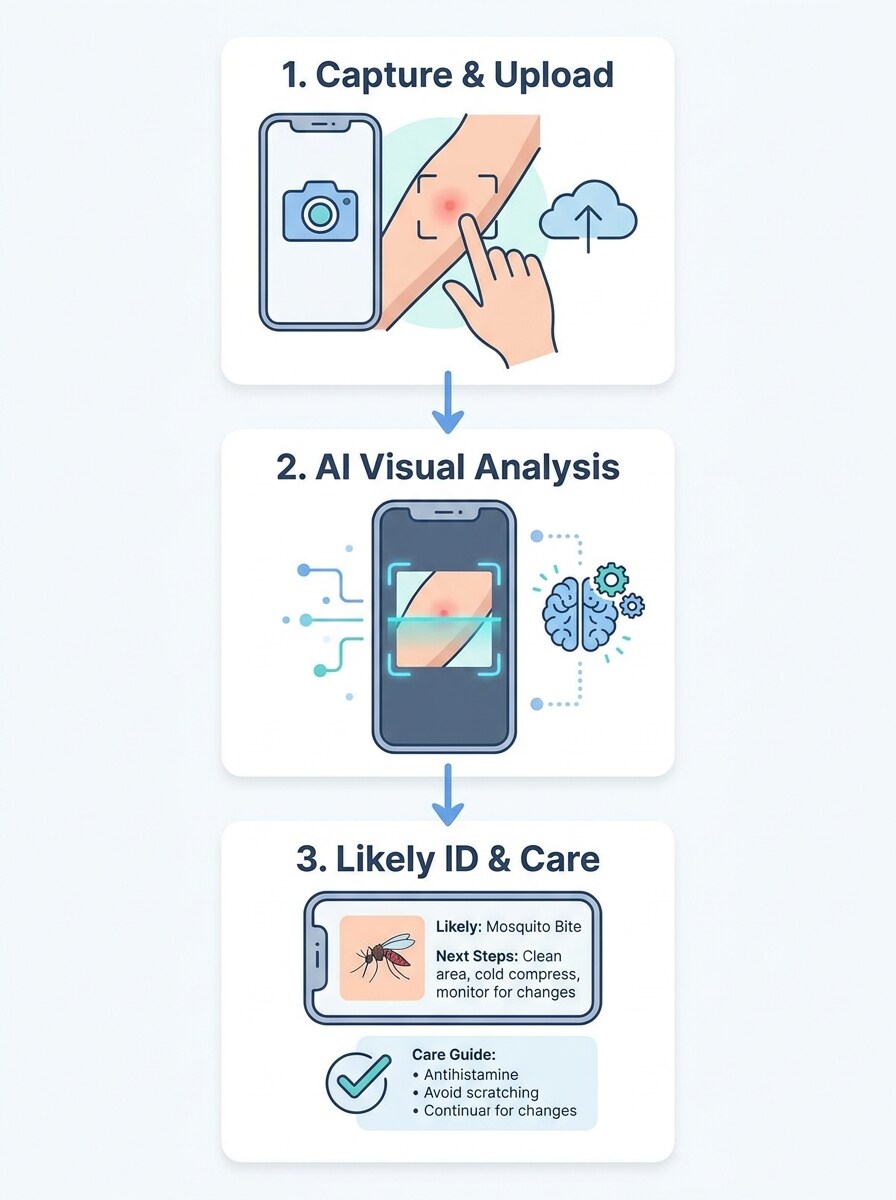
Usa la imagen subida como el primer panel en un explicativo paso a paso. Muestra un flujo simple de tres etapas desde la foto de la picadura subida hasta el Análisis de IA y luego al resultado de identificación probable y guía de cuidado, con visuales médicos amigables, flechas claras, composición equilibrada y estilo educativo minimalista legible.
Gráfico "¿Qué me picó?"
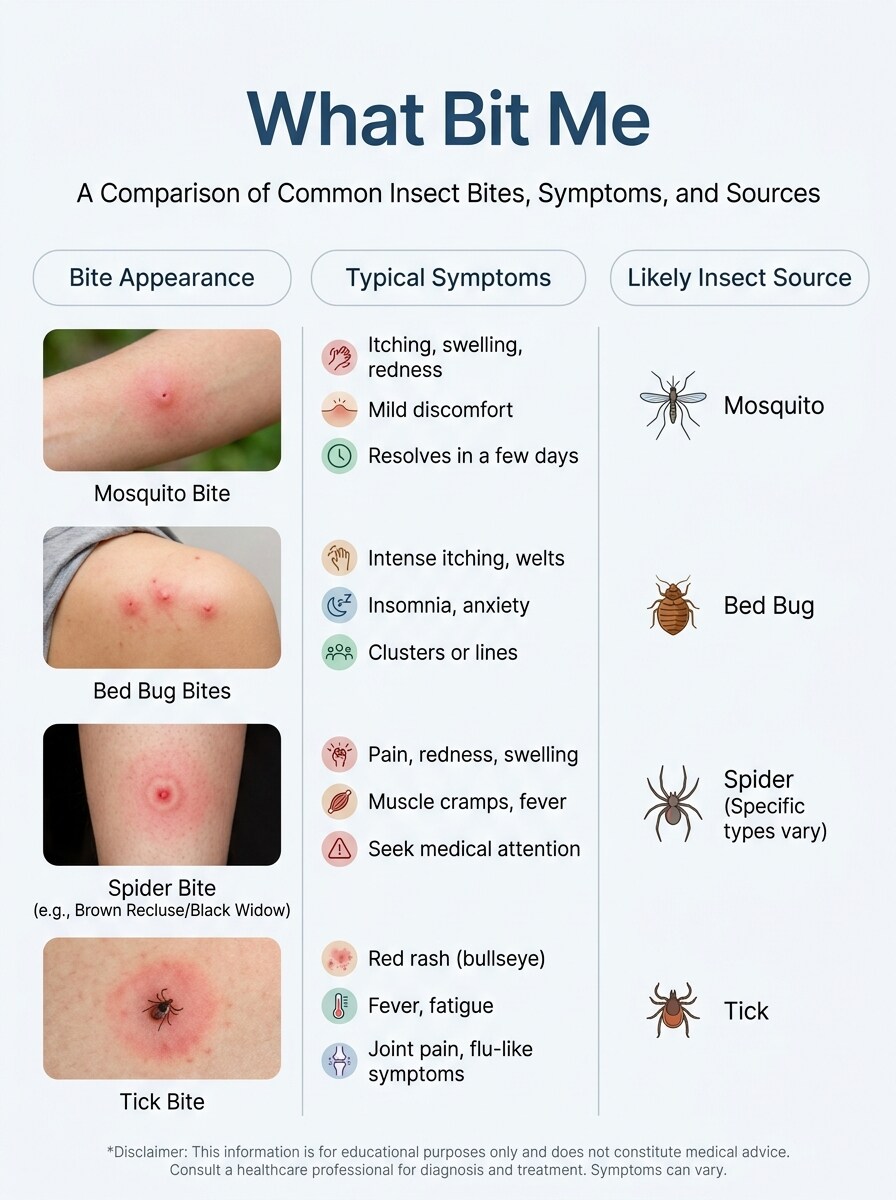
Usa la imagen subida como ejemplo destacado dentro de un gráfico educativo que compare diferentes apariencias de picaduras. Mantén tu foto de picadura realista mientras la rodeas con etiquetas concisas de apariencia, síntomas comunes y fuente probable del insecto, usando una paleta médica calmada y un diseño de infografía estructurado.
Panel de cuándo buscar atención médica
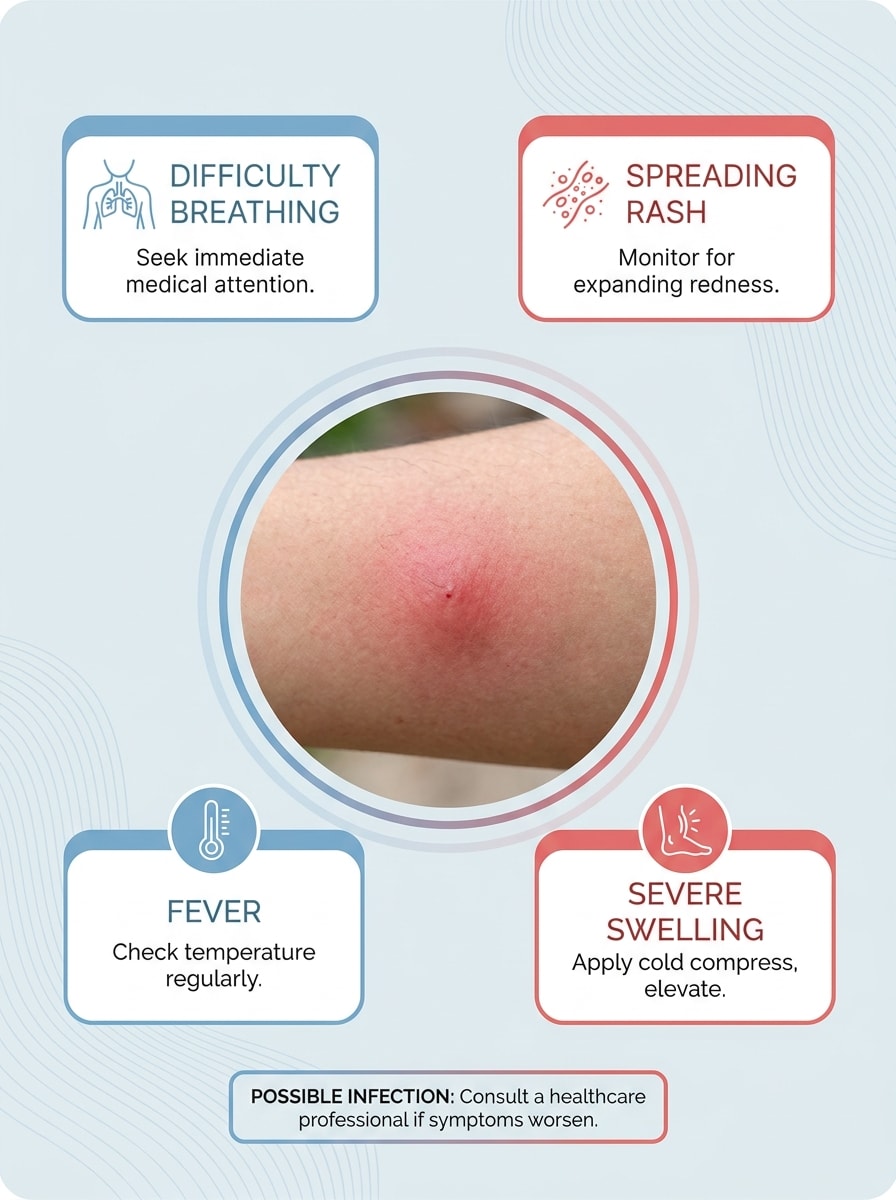
Usa la imagen subida como elemento visual central y transfórmala en un panel médico con enfoque en seguridad. Agrega indicaciones sutiles para señales de alerta como sarpullido que se extiende, hinchazón severa, fiebre o riesgo de infección, manteniendo la foto de la picadura realista, el diseño despejado y el tono calmado y tranquilizador.
Tarjetas de comparación deslizables
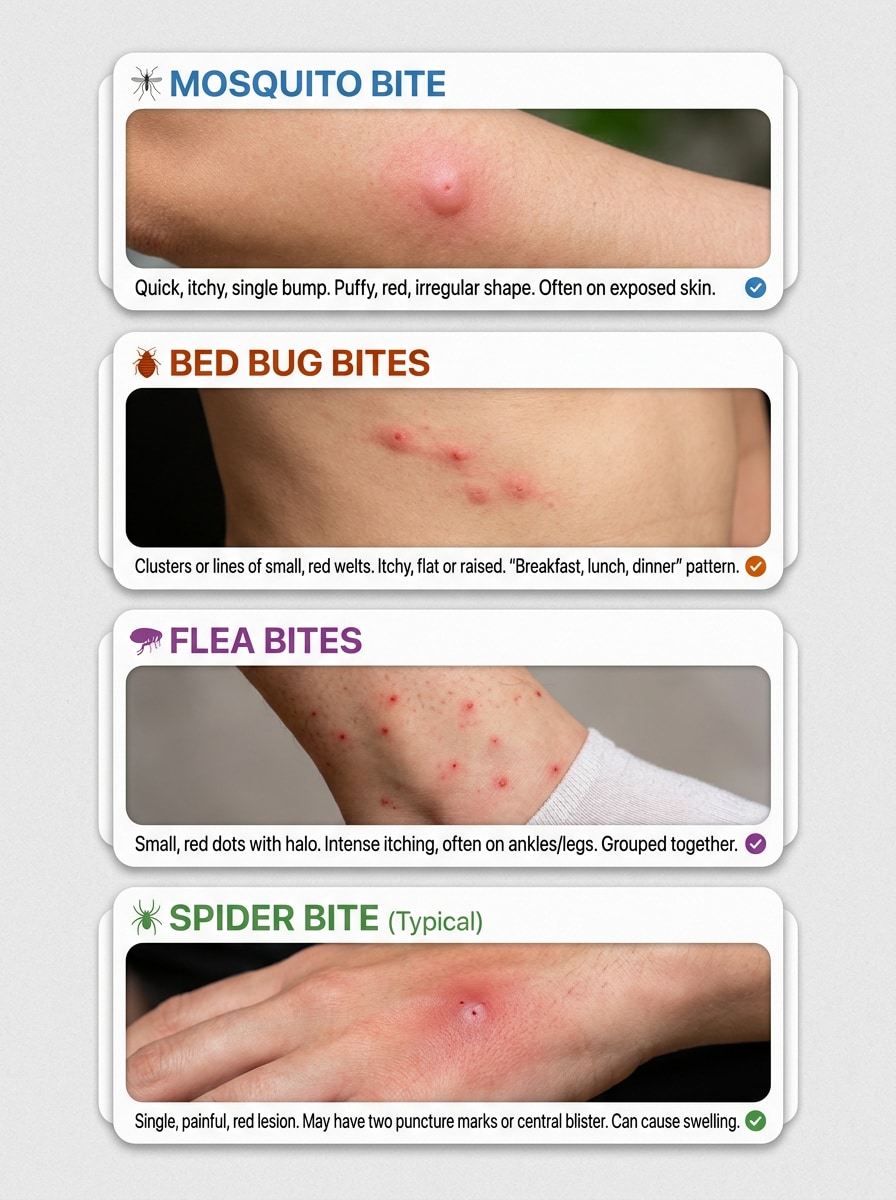
Usa la imagen subida como un ejemplo de comparación en un conjunto vertical de tarjetas deslizables. Crea paneles rápidos y adaptados a móvil que comparen patrones de picaduras de mosquito, chinche, pulga y araña, con encabezados en negrita, imágenes realistas de piel, señales claras de síntomas y subtítulos educativos de alto contraste para una visualización fácil.
Visual de mito vs. coincidencia
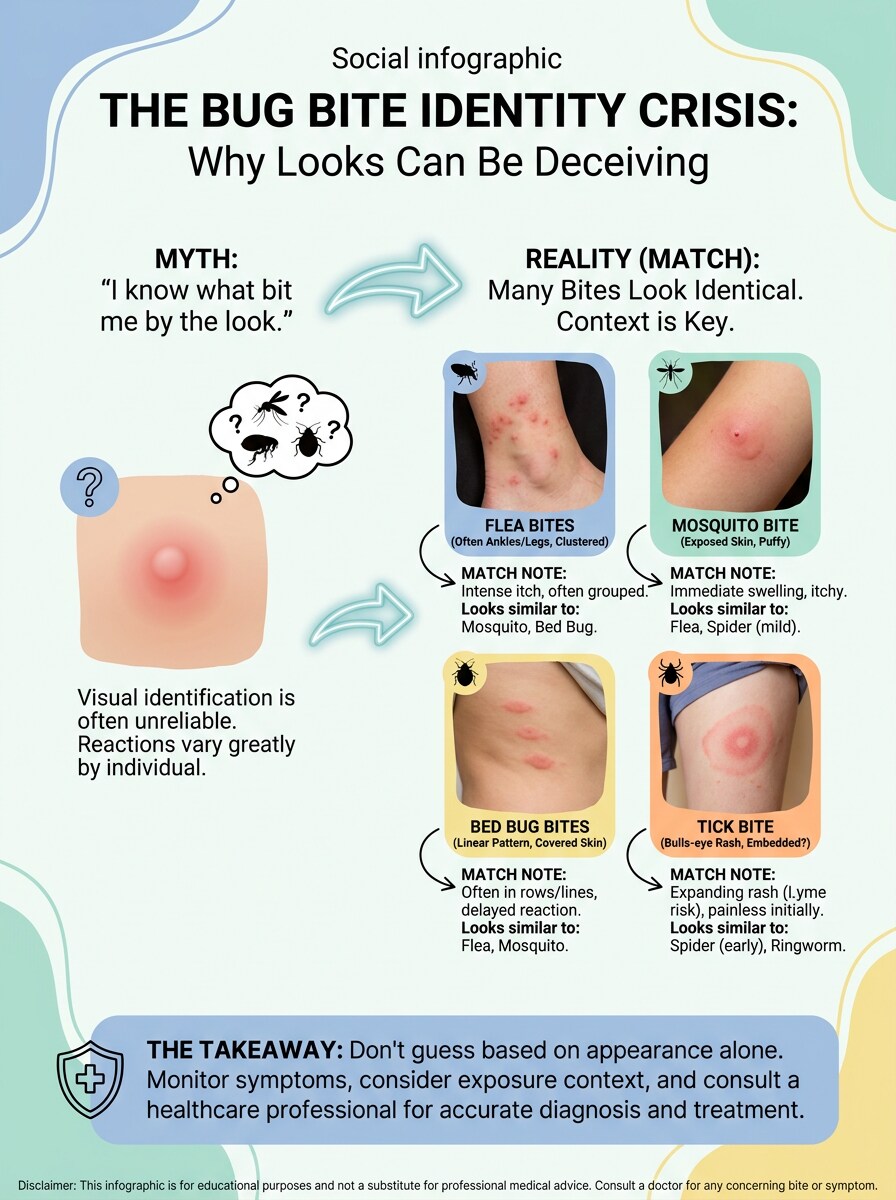
Usa la imagen subida como ejemplo realista de picadura y conviértela en un visual educativo de mito versus realidad. Enfatiza que muchas picaduras se ven similares agregando flechas comparativas, notas aclaratorias breves, etiquetas limpias, colores clínicos suaves y un diseño equilibrado que transmita confianza en lugar de dramatismo.
Biblioteca de resultados de ejemplo
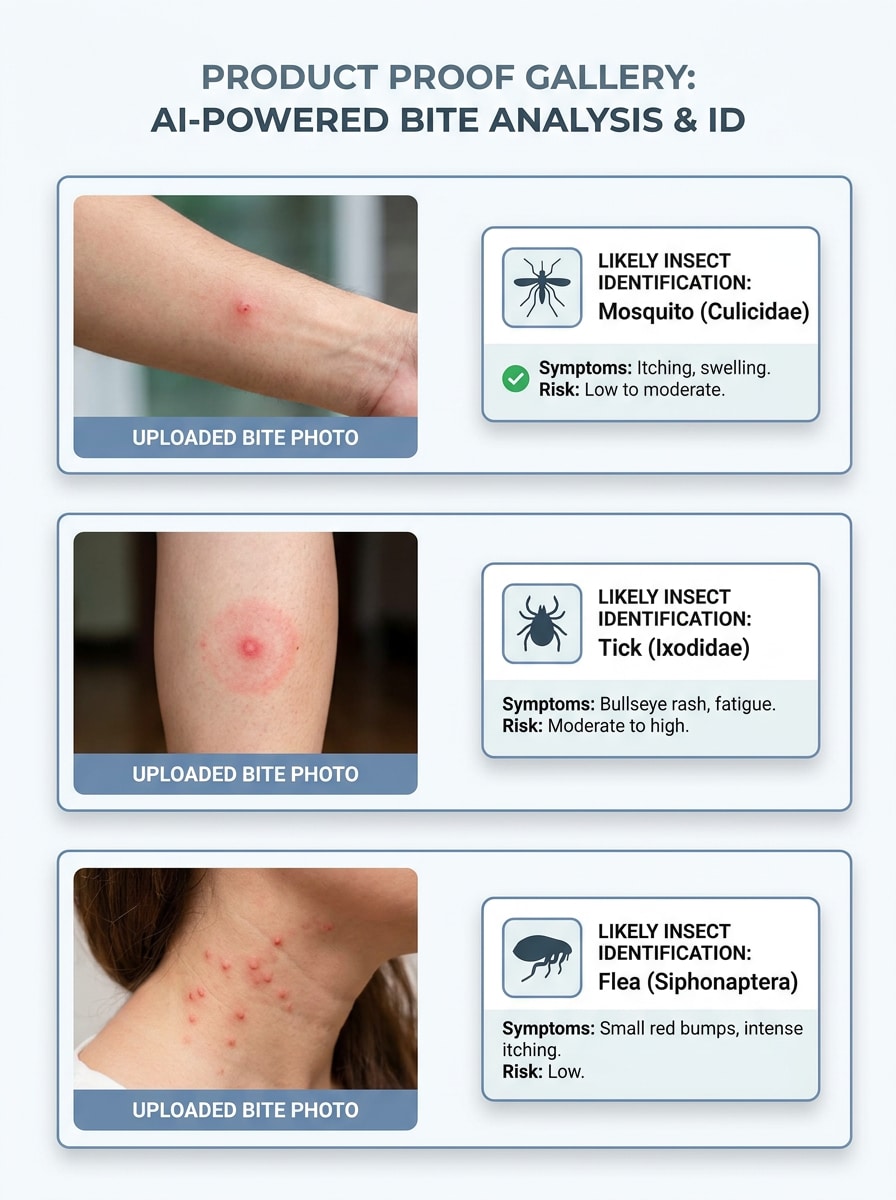
Usa la imagen subida como una muestra en una galería de prueba de producto con coincidencias probables. Combina la foto de la picadura con tarjetas de resultados ordenadas para posibles fuentes de insectos, notas de comparación concisas y agrupación visual limpia, usando espacio en blanco, sombras suaves y una Presentación de tecnología médica confiable para una revisión fácil.
Visual de carga segura con privacidad
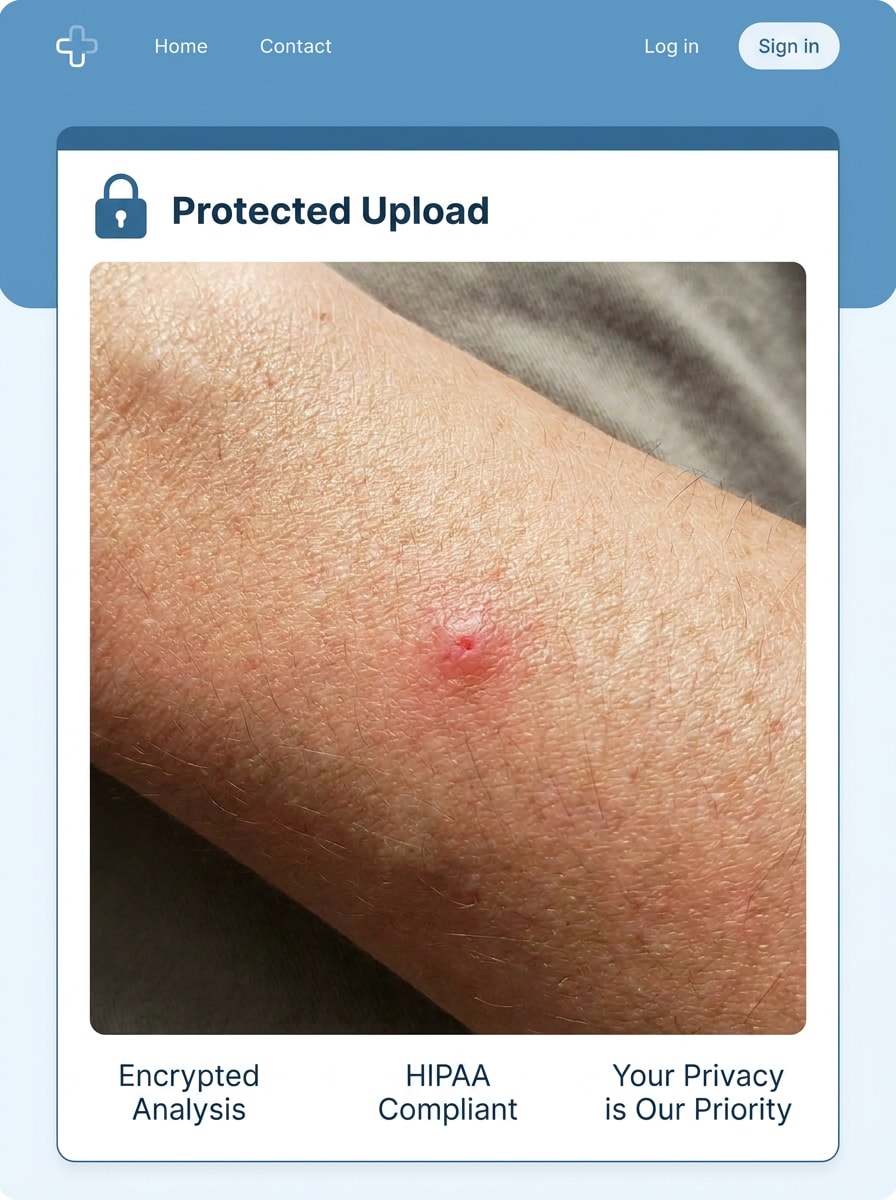
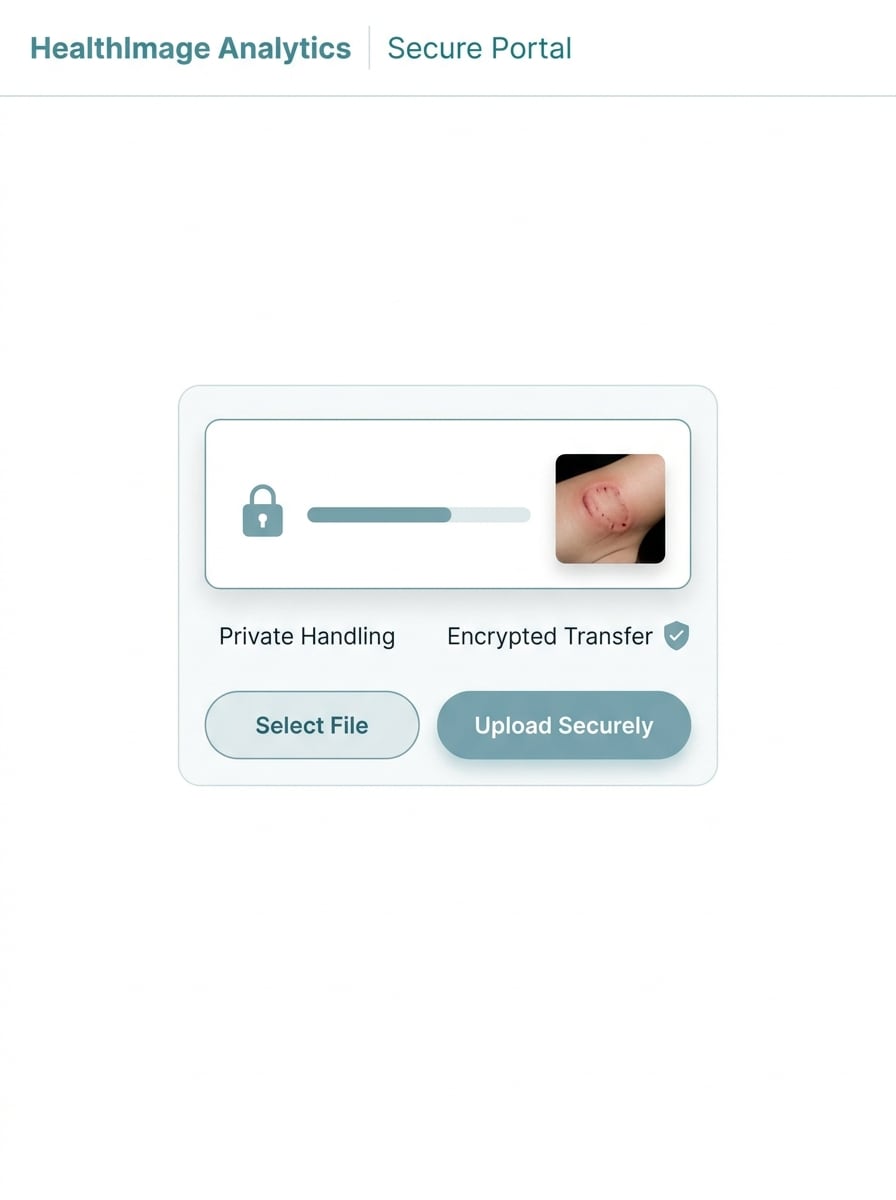
Usa la imagen subida como contenido protegido dentro de una interfaz de análisis segura. Muestra la vista previa de la foto de la picadura con elementos de diseño enfocados en la privacidad como un icono de candado, estado de carga protegida y etiquetas de seguridad limpias, manteniendo el detalle realista de la piel, una interfaz mínima y una apariencia calmada de SaaS sanitario.
Por qué usar Media.io para verificar fotos de picaduras de insectos
Cargas rápidas desde el móvil para comparaciones al instante
Si el sujeto aún necesita parecerse a sí mismo después de la transformación, Media.io ayuda a conservar las señales de identidad principales mientras actualiza el estilo visual final del identificador de picaduras de insectos para un resultado más limpio. También es una opción práctica como identificador de picaduras de insectos.
Explora diferentes estilos sin perder la dirección
Cuando la dirección artística aún está abierta, Media.io te permite probar múltiples estilos alrededor de la misma idea visual del identificador de picaduras de insectos, facilitando encontrar el estilo adecuado sin reconstruir desde cero.
Genera resultados más limpios hasta 4K
Si el visual final del identificador de picaduras de insectos se reutilizará más allá de una vista previa pequeña, Media.io ayuda a entregar resultados más nítidos hasta 4K para que la imagen sea más confiable en trabajos prácticos de diseño y Presentación.
Trabaja en cualquier dispositivo sin instalaciones adicionales
Ya sea que estés explorando visuales del identificador de picaduras de insectos en un portátil o revisando borradores desde tu Teléfono, Media.io mantiene todo basado en el navegador para que puedas retomar el mismo flujo de trabajo en diferentes dispositivos con mayor facilidad.
Cómo usar este identificador de picaduras de insectos por foto
Convierte tus palabras en visuales impresionantes en tres simples pasos y luego continúa refinando el resultado si deseas llevarlo más lejos.
Paso 1
Sube tu imagen de referencia
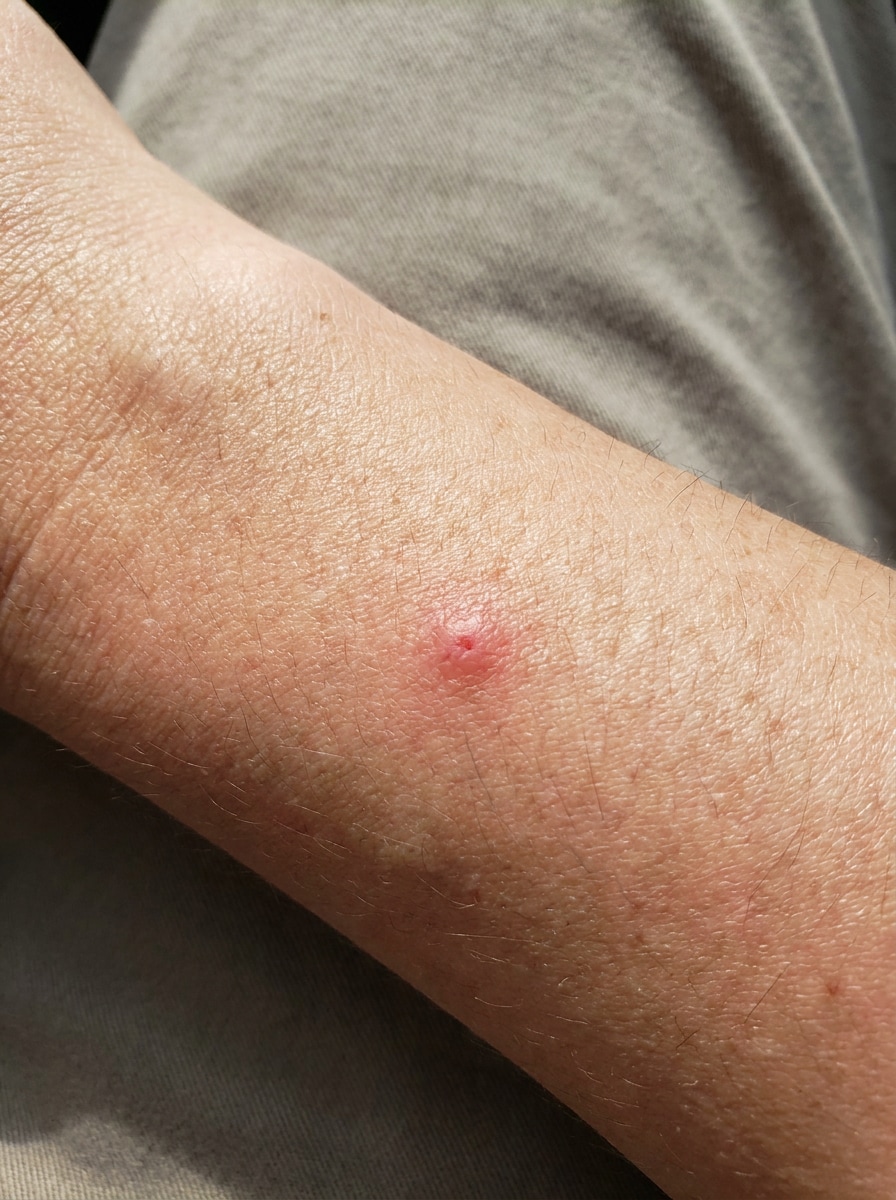
Sube una foto clara en primer plano del área de la picadura en formato JPG, PNG o JPEG. Una imagen nítida con textura de piel visible, enrojecimiento, hinchazón o patrones de agrupación le da a la herramienta una mejor base visual para la comparación de picaduras de insectos.
Paso 2
Describe el cambio y configura las opciones
Agrega un prompt para el tipo de resultado que deseas, como una tarjeta de comparación etiquetada, superposición de síntomas o resultado de análisis visual. Luego elige el modelo y ajusta la relación de aspecto, la calidad y la cantidad de imágenes según tus necesidades de revisión.
Paso 3
Genera, descarga y sigue mejorando
Genera el resultado, compara la salida visual y descarga la versión que te ayude a revisar la picadura con mayor claridad. Puedes refinar la indicación, crear variaciones adicionales o Regenerar con un Diseño diferente para una guía más clara.
Desbloquea el potencial de las imágenes de identificación de picaduras de insectos
Descubre cómo los creadores usan Media.io para visuales de patrones de picaduras, contenido de referencia y seguimiento personal, y luego adapta cada idea a tus necesidades.
Compara marcas misteriosas antes de empezar a adivinar
Si estás intentando identificar una picadura de insecto por imagen, una comparación visual puede ser más útil que desplazarte por artículos llenos de texto. Media.io puede convertir una foto en primer plano en resultados más limpios de estilo referencia que te ayudan a comparar agrupaciones, ronchas individuales, anillos y patrones de hinchazón lado a lado.
Crea tarjetas de referencia de picaduras personales para la familia o los viajes
Padres, viajeros y entusiastas del aire libre pueden guardar visuales fáciles de revisar en lugar de depender solo de la memoria. Media.io ayuda a crear tarjetas de comparación simples para tipos comunes de picaduras de insectos, verificaciones rápidas de síntomas, identificación de picaduras de chinches, o cuando deseas identificar picaduras de chinches con un registro más organizado.
Crea visuales educativos para blogs, clínicas o publicaciones en redes sociales
Escritores, educadores de salud y creadores pueden usar Media.io para producir recursos tipo gráfico para explicaciones de identificación de picaduras de insectos, guías de imágenes de identificación de picaduras de insectos o un visual estilo gráfico de identificación de picaduras de araña que sea más fácil de escanear en dispositivos móviles cuando los lectores quieren identificar patrones de picaduras de araña.
Lo que dicen los usuarios
Maya R.
Madre
"Útil para comparaciones rápidas" Subí un primer plano desde mi Teléfono y obtuve una imagen de comparación mucho más clara que los gráficos aleatorios de picaduras que estaba buscando. Me ayudó a reducir qué observar antes de decidir si buscar consejo médico.
Daniel T.
Bloguero de viajes
"Fácil de usar en
Sonia P.
Investigadora de contenido
"Bueno para material visual educativo" Lo usé para crear gráficos de estilo comparativo para un borrador de artículo. Los diseños facilitaron la explicación de diferentes patrones de mordeduras, especialmente al hablar de chinches, pulgas y posibles marcas de arañas.
Eric L.
Entusiasta de actividades al aire libre
"Útil para una revisión organizada" En lugar de solo mirar una foto de una picadura, la convertí en un visual con estilo de etiquetas y comparé varias posibilidades. Eso hizo que todo el proceso se sintiera más estructurado y menos como adivinar.
Explora los efectos de video e imagen con IA más populares
Preguntas frecuentes sobre el identificador de picaduras de insectos
1. ¿Puedo tomar una foto de una picadura de insecto e identificarla en línea?
Por lo general, puedes obtener un primer borrador rápidamente y luego mejorarlo con pequeñas ediciones de indicaciones en lugar de reconstruir todo el diseño desde cero.
2. ¿Qué tan preciso es un identificador de picaduras de insectos con IA a partir de una foto?
La precisión depende en gran medida de la calidad de la imagen, las características visibles de la picadura y lo distinguible que sea la marca. Media.io funciona mejor como una ayuda visual para comparar patrones comunes en una foto, por lo que los resultados de identificación de picaduras de insectos deben tratarse como coincidencias probables en lugar de un diagnóstico confirmado.
3. ¿Este identificador de picaduras de insectos es gratuito?
Media.io ofrece créditos gratuitos para nuevos usuarios, por lo que puedes probar la herramienta antes de actualizar tu plan. Si necesitas más uso, puedes explorar los planes en la página de precios. Las exportaciones gratuitas pueden incluir marcas de agua, mientras que los planes de pago permiten descargas en alta resolución sin marcas de agua.
4. ¿Qué tipos de picaduras de insectos puede reconocer la herramienta?
Media.io puede ayudarte a crear comparaciones visuales de patrones comunes de picaduras como las de mosquito, pulga, chinche, garrapata, hormiga, picadura de abeja y algunas marcas similares a las de araña. Esto lo hace útil para revisiones de identificación de picaduras de insectos, verificaciones de identificación de picaduras, o cuando deseas identificar picaduras de chinches y comparar una imagen con referencias comunes de identificación de picaduras de araña.
5. ¿Necesito una foto de primer plano para una mejor identificación de picaduras de insectos?
Sí, una foto de primer plano generalmente ayuda. Una imagen nítida con buena iluminación y detalles visibles como enrojecimiento, hinchazón, espaciado o agrupamiento le proporciona a Media.io información visual más útil para la revisión de identificación de picaduras, la identificación de picaduras de insectos y resultados de comparación más claros.
6. ¿Puedo usar el identificador de picaduras de insectos en mi Teléfono?
Media.io está basado en la web, por lo que puedes usarlo en cualquier Teléfono, tableta o computadora con un navegador, incluidos dispositivos iOS y Android. Esto lo hace conveniente cuando deseas identificar una picadura de insecto mediante una imagen o usar un identificador de picaduras de insectos por foto sin descargar software adicional.
Más allá del identificador de picaduras de insectos en línea con IA