Holi AI Photo Editing Prompts

Use Holi AI photo editing prompts to create Happy Holi AI photos, gulal portraits, white kurta looks, couple edits, family images, and social posts with Media.io.
Alle Einreichungen

Holi AI Photo Editing Prompts: Create Colorful Festival Photos with AI

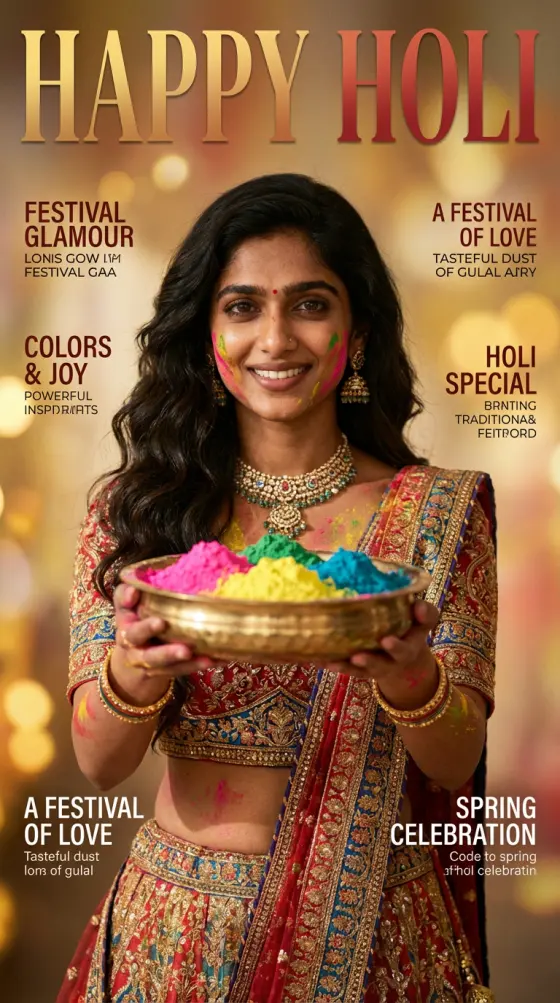
Looking for Holi AI photo editing prompts? Use Media.io to turn selfies, family photos, couple pictures, or plain portraits into Happy Holi AI photos with gulal clouds, white kurta looks, cinematic color splash, 3D poster-style portraits, Instagram posts, and WhatsApp status images.

Upload a photo, paste or adapt a Holi AI prompt, and generate festival-ready images for Instagram, WhatsApp, Facebook, and more.

What Are Holi AI Photo Editing Prompts?

Holi AI photo editing prompts are detailed text instructions that tell an AI image editor how to create colorful festival photos. With Media.io, you can describe gulal powder, white kurta outfits, traditional Indian streets, family celebrations, couple portraits, cinematic lighting, vintage looks, or Happy Holi poster styles, then generate polished AI photos online.

Realistic Holi Gulal Portrait Prompts

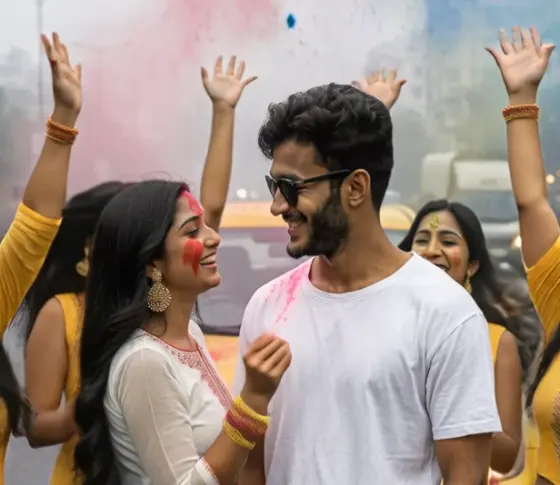
Create realistic Holi AI photos with bright pink, yellow, blue, and green gulal on the face, soft sunlight, joyful expressions, white kurta outfits, and festive street or courtyard backgrounds.

Happy Holi Couple and Family Photo Prompts

Turn couple photos, family portraits, or friend group shots into Happy Holi AI photo edits with colorful powder, festive smiles, marigold decor, traditional outfits, and warm celebration scenes.

Cinematic Holi Color Splash Prompts

Generate Bollywood-inspired Holi festival images with dramatic powder explosions, water balloon action, flying color clouds, motion energy, lens glow, and high-impact social media composition.

Vintage, Golden Hour, and 3D Holi AI Prompt Ideas

Explore creative Holi photo editing prompts for vintage India film looks, golden-hour festival portraits, watercolor color dust, neon Holi posters, and 3D Happy Holi AI photo styles.

How to Use Holi AI Photo Editing Prompts in 3 Steps

01

Step 1: Upload a Selfie or Portrait

Add a selfie, couple photo, family picture, friend group shot, or plain portrait. Media.io prepares your image for a Holi AI photo editing prompt workflow.

02

Step 2: Paste or Customize a Holi Prompt

Describe the look you want: gulal powder, white kurta, Happy Holi text, family celebration, romantic couple edit, cinematic color splash, vintage film, or 3D festival poster.

03

Step 3: Generate and Download

Let AI create a colorful Holi festival photo. Preview the result, download your Happy Holi AI image, and share it on Instagram, WhatsApp, Facebook, or other social platforms.

Popular Uses for Holi AI Photo Editing Prompts

Instagram Posts and Reels Covers

Create scroll-stopping Holi AI photos with bright gulal, cinematic lighting, colorful backgrounds, and portrait-ready composition for Instagram posts, stories, and Reels covers.

WhatsApp Status and DP Images

Generate Happy Holi AI photo edits for WhatsApp status, profile pictures, festive greetings, and colorful social updates without needing advanced photo editing skills.

Family, Couple, and Friends Holi Edits

Transform everyday portraits into warm Holi festival memories with traditional outfits, gulal-covered faces, playful powder scenes, couple moments, and group celebration prompts.

Creators Love These Holi AI Photo Editing Prompts

user
Festival Creator

Instagram Creator

star star star star star

“Perfect Happy Holi post.” I uploaded a simple selfie, used a gulal portrait prompt, and Media.io created a colorful Holi AI photo that looked ready for Instagram.

user
Social Media Editor

Content Marketer

star star star star star

“Great for WhatsApp status.” The Holi AI photo editing prompt helped me create a bright family festival image with traditional outfits and colorful powder in minutes.

user
Content Beginner

AI Photo User

star star star star star

“Easy and beginner-friendly.” I had no design experience. I described a white kurta, gulal colors, and a Happy Holi greeting, then Media.io generated a polished festival photo.

FAQs: Holi AI Photo Editing Prompts, Happy Holi AI Photos, and Festival Edits

1. What are Holi AI photo editing prompts?

Holi AI photo editing prompts are text descriptions used to guide an AI image editor. A good prompt can describe the person, outfit, gulal colors, background, lighting, mood, and output format, helping you create Happy Holi AI photos for social posts, greetings, profile pictures, and festival memories.

Upload your selfie or portrait to Media.io, enter a Holi AI photo editing prompt, and generate the image. You can ask for realistic gulal on the face, a white kurta look, a colorful Holi street scene, a couple edit, a family celebration, or a poster-style Happy Holi greeting.

Yes. You can adapt Holi AI photo editing prompts for Media.io or other AI image tools, including Gemini-style, ChatGPT-style, or Nano Banana-style prompt workflows. Media.io is an independent AI creative platform and is not affiliated with those third-party tools.

A strong prompt should include the subject, festival setting, clothing, color details, lighting, style, and format. For example, mention a smiling portrait, white kurta, pink and yellow gulal, Indian street celebration, golden-hour light, cinematic realism, and a vertical image for Instagram or WhatsApp status.

Yes. Holi AI photo editing prompts work well for Instagram posts, Reels covers, WhatsApp status images, profile pictures, Facebook greetings, and festival campaign visuals. You can create square, portrait, or vertical-style images depending on where you want to share them.

Media.io Online AI Tools Quality Rating:
vote 4.7 (162,357 Votes)



