BEFORE
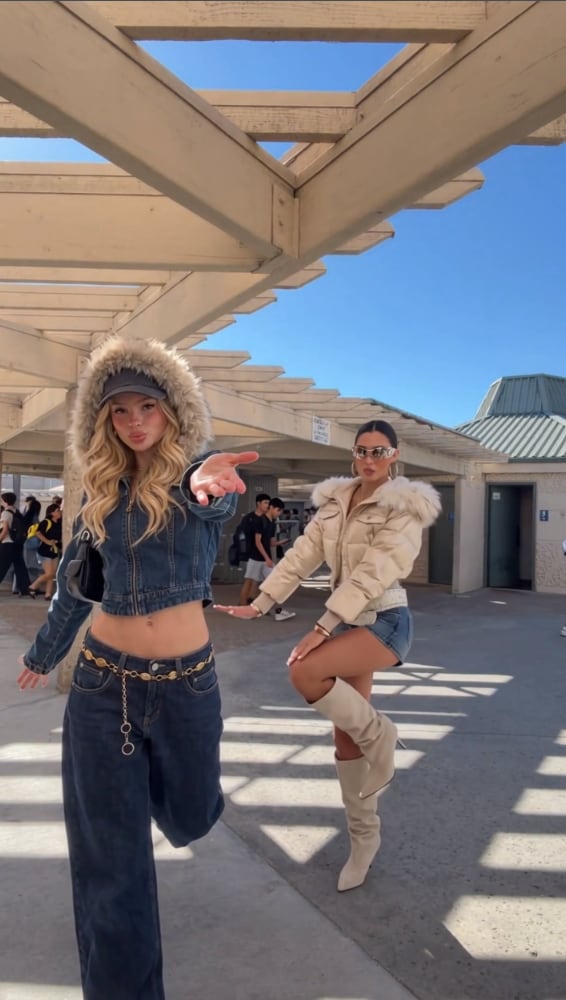
Original Reference Photos
Two authorized people
Turn two authorized portraits into a playful Zany Dance AI video. Build a shared reference frame, then prompt loose arm swings, a raised-knee balance, a friend's delayed entrance, and a final synchronized wave. Review the timing and identities before sharing your clip.
Two portraits become a playful dance with a friend.
Two authorized people
Delayed entrance and shared wave
Start with one dancer's relaxed arm swings, then let the friend enter a moment later and copy the move. That small delay is the joke. Keep both figures in a steady, full-body frame so viewers can follow who leads and who joins.
The lifted knee is a recognizable pause in the routine. Ask for a brief, stable balance with feet and legs visible, rather than a long hold or fast camera move. Check the generated take for changing limbs, then shorten the action if needed.
Build your own version with portraits you have permission to use. If your selected Image to Video model accepts only one image, place both people in one reference frame first. Clear faces, separated bodies, and similar lighting make the result easier to review.
A final two-person wave gives the short clip a clean stopping point for a Reel, Short, or chat reaction. Add the caption and music in an editor after generation, so the visual prompt can focus on the pose, entrance, and timing.
Choose clear, full-body photos of the two people. If the selected model offers one image upload, combine the portraits into a single reference image with room around both figures. Open Media.io Image to Video and upload that reference.
Describe relaxed, floppy arm swings, the lead dancer raising one knee, the friend joining a beat late to imitate, and both waving together at the end. Request a steady vertical shot and keep the sequence short enough for the model to follow.
Generate a take and inspect faces, hands, the raised leg, and the friend's entrance. If the delay is unclear, make two short clips and join them in an editor. Add your own caption and licensed audio before posting.
See what creators are making on TikTok, Reels & Shorts — watch the effects and try your next viral idea.
Explore All AI TrendsIt is a playful short video built around loose arm swings, a one-leg pose, a friend's delayed imitation, and a shared wave. You can use the sequence as a prompt for an original AI dance clip. The result may vary between models, so review the full-body motion before you share it.
Start with two photos you are allowed to use. Put both people into one clear reference image if your selected Image to Video model accepts a single upload; use separate reference slots only when that model offers them. Then describe the lead dancer, delayed friend, and final synchronized wave in order.
You can ask the friend to wait near the edge of frame and join after the lead dancer's first pose. A short, fixed-camera shot gives the timing a better chance to read clearly. If the generator places both dancers in motion immediately, create the lead and duo moments as separate clips and cut them together.
Use a full-body reference with visible feet, request one raised knee for a brief beat, and avoid rapid spins or camera cuts during the pose. Check the knees, feet, and floor contact in the preview. If a take bends or adds limbs, simplify the prompt and generate another version.
The visual generation step creates the dance footage. Add the caption and audio you have permission to use in a video editor after downloading. This also lets you time the friend's entrance and final wave to your chosen beat without claiming an official emote or soundtrack is included.