AI Snowman Video Generator: Transform Yourself into AI Snowman

Join the viral AI snowman trend and transform your photo into a festive snowman animation with falling snow, winter lighting, and playful motion. Just upload a photo and let AI turn you, your friends, or family into a cute animated snowman video—perfect for TikTok, Reels, and Christmas sharing. No editing skills, no app, all online.

Try AI Snowman Effect Free
✓Photo-to-video ✓Cute snowman animation ✓9:16 or 16:9 ✓MP4 download
AI Snowman Transformation Video
#Image to Video #SnowmanEffect
AI Photo to Snowman Animation
#PeopletoSnowman #AISnowman
Style AI Snowman Effect Prompts Copy
Prompt 01 · Classic Snowman Transformation
#snowman #christmas #sparkle

A snowball falls from above and hits the person, magical impact with sparkle burst, the person immediately transforms into a three-tier snowman character with their facial features incorporated, smooth morphing animation as carrot nose appears, winter scarf and hat materialize, stick arms extend from sides, the background remains completely unchanged throughout the entire transformation, gentle snowflakes begin falling around, magical particle effects during transition, seamless fluid animation, festive Christmas atmosphere, 6-8 seconds

Prompt 02 · Magical Snowman Reveal
#snowfall #winter #bokeh

Scene opens with heavy snowfall, a snowball tumbles down from above spinning and growing, lands with soft impact creating snow dust cloud, magical sparkle burst reveals an adorable snowman version of the person emerging from the snow cloud, the snowman character has personalized facial features matching the original photo, complete snowman costume with orange carrot nose, black coal eyes and smile, colorful knit scarf, warm winter beanie or top hat, twig arms that gesture welcomingly, continuous gentle snowfall throughout, winter wonderland background with bokeh lights, dramatic magical transformation effect, Christmas joy and festive spirit, fluid animation with particle effects

Why Choose Media.io’s AI Snowman Effect

❄️ Turn Yourself into a Snowman — Instantly

Upload a selfie or group photo and watch the AI magically transform people into animated snowman characters—complete with sparkles, snow dust, and festive effects. The original background stays 100% unchanged throughout the animation, creating a realistic “caught-on-camera” snowman transformation.

🎬 Viral Snowman Video Effects

Create short, eye-catching AI snowman videos designed for social media. Generate dramatic people-to-snowman transformations in both 9:16 (TikTok/Reels) and 16:9 (YouTube) formats—perfect for holiday trends and viral posts.

✨ Smooth, Cinematic Transformations

Powered by top-tier image-to-video AI models like Sora 2, Veo 3.1, Kling 2.6, and Wan 2.6, the transformation is fluid and natural—from the snowball impact to the final snowman reveal. Works for individuals, friends, kids, couples, and family photos.

⚡ Online, Fast & Watermark-Free

No apps, no editing skills required. Everything runs directly in your browser. Generate and download HD snowman videos, optimized for social sharing and holiday posts—with no watermark.

How to Make an AI Snowman Transformation Video

01

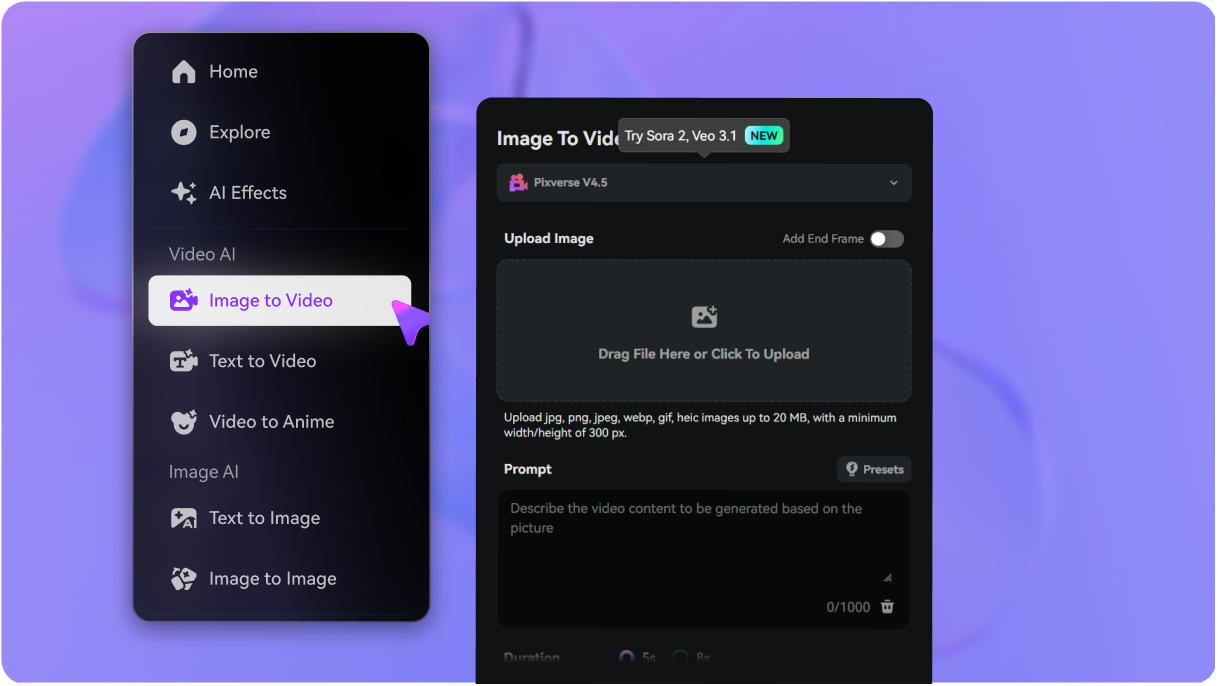
Open Image-to-Video AI

Go to Media.io Image-to-Video AI and select one of the supported video models (such as Sora, Veo, Kling, or Wan) to start creating your AI snowman effect.

02

Upload Your Photo

Upload a clear selfie or group photo. Copy one of the AI snowman transformation prompts from this page and paste it into the prompt box. You can tweak details like snowman style, effects, or mood if you want.

03

Generate & Download

Click Generate and wait a few seconds while the AI transforms your photo into a snowman video. Download the result in HD and share it on TikTok, Instagram Reels, or anywhere you like.

FAQs About the AI Snowman Effect

1. What is the AI snowman effect?

The AI snowman effect is a viral transformation effect that turns a person in a photo into an animated snowman. After you upload a selfie or group photo, the AI generates a short video where a snowball hits the subject and magically transforms them into a festive snowman— complete with snow, sparkles, scarf, and winter accessories—while keeping the original background completely unchanged.

The AI snowman trend is popular because it combines holiday magic, cute visuals, and dramatic transformations into a short, shareable video. It’s perfect for TikTok, Instagram Reels, and Shorts—people love seeing themselves, friends, or family members turned into animated snowman characters with smooth, cinematic effects.

No. You only need to upload one photo. Media.io uses advanced image-to-video AI to animate your photo into a snowman transformation video. There’s no need to record or upload any original video footage.

Media.io Online AI Tools Quality Rating:
vote 4.7 (162,357 Votes)

AI Snowman Effect – Turn Yourself into a Cute Snowman Video

Join the viral AI snowman trend and transform your photo into a festive snowman animation with falling snow, winter lighting, and playful motion. Just upload a photo and let AI turn you, your friends, or family into a cute animated snowman video—perfect for TikTok, Reels, and Christmas sharing. No editing skills, no app, all online.

✓ Photo to snowman video    ✓ Single or group photos    ✓ Vertical TikTok format    ✓ Watermark-free downloads
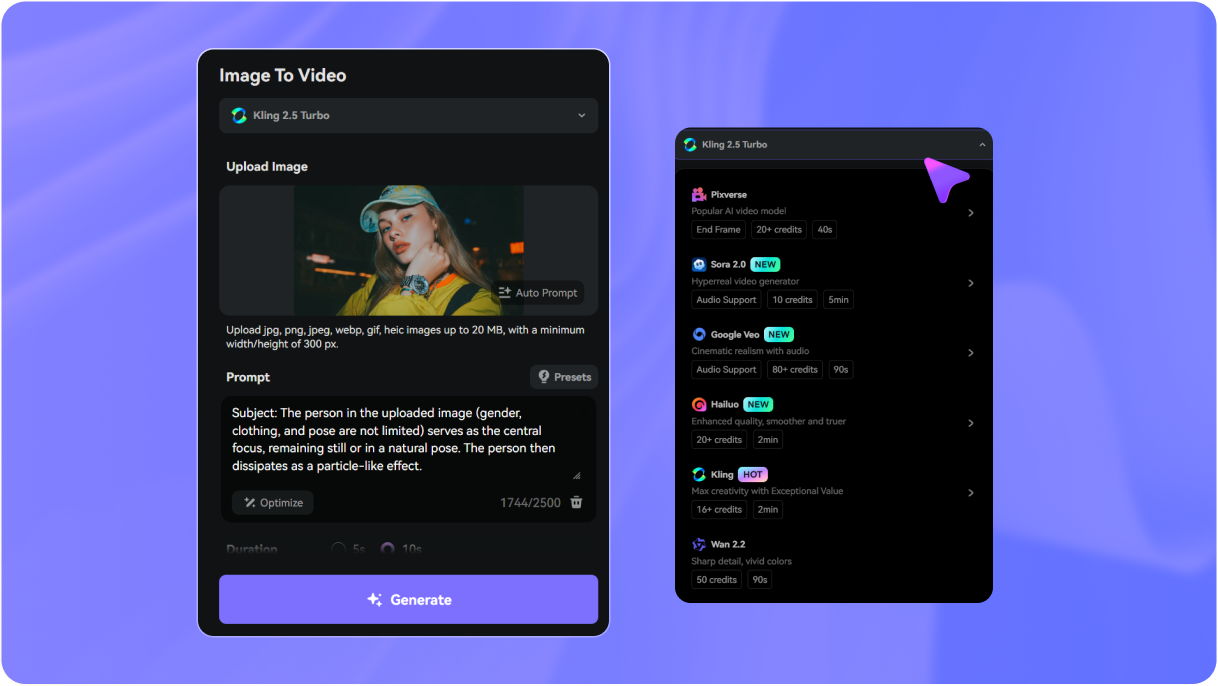
Prompt for AI Disintegration Video
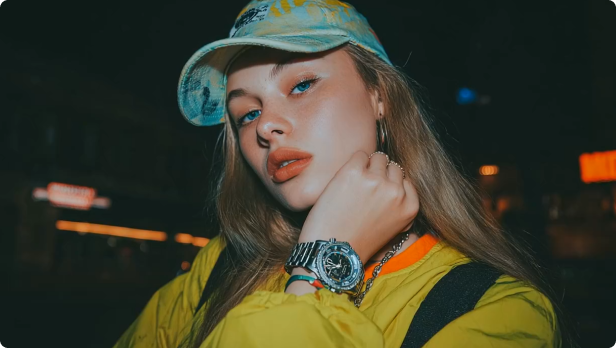
Original Image for AI Disintegration
Subject: The person in the uploaded image (gender, clothing, and pose are not limited) serves as the central focus, remaining still or in a natural pose. The person then dissipates as a particle-like effect.

Action: The particle-like dissipation effect begins at a specific edge of the body (e.g., left shoulder, right arm, or lower body edge) and gradually spreads to the entire body. Particles drift like wind, outlines blur, and the person fully disappears over a total duration of ~5 seconds.

Scene: The original background is completely preserved and remains stable. Soft reflective light particles appear during the dissipation. After the person disappears, the scene holds still for ~0.5 seconds, emphasizing a sense of emptiness.

Camera: Fixed camera, no zoom or movement.

Visual Effects (VFX): Particle size 0.5–2 mm, dust–glitter style, colors sampled from the subject, subsurface glow, directional drift, light wind, dissipating afterimages, ending in full transparency.
Generate Now
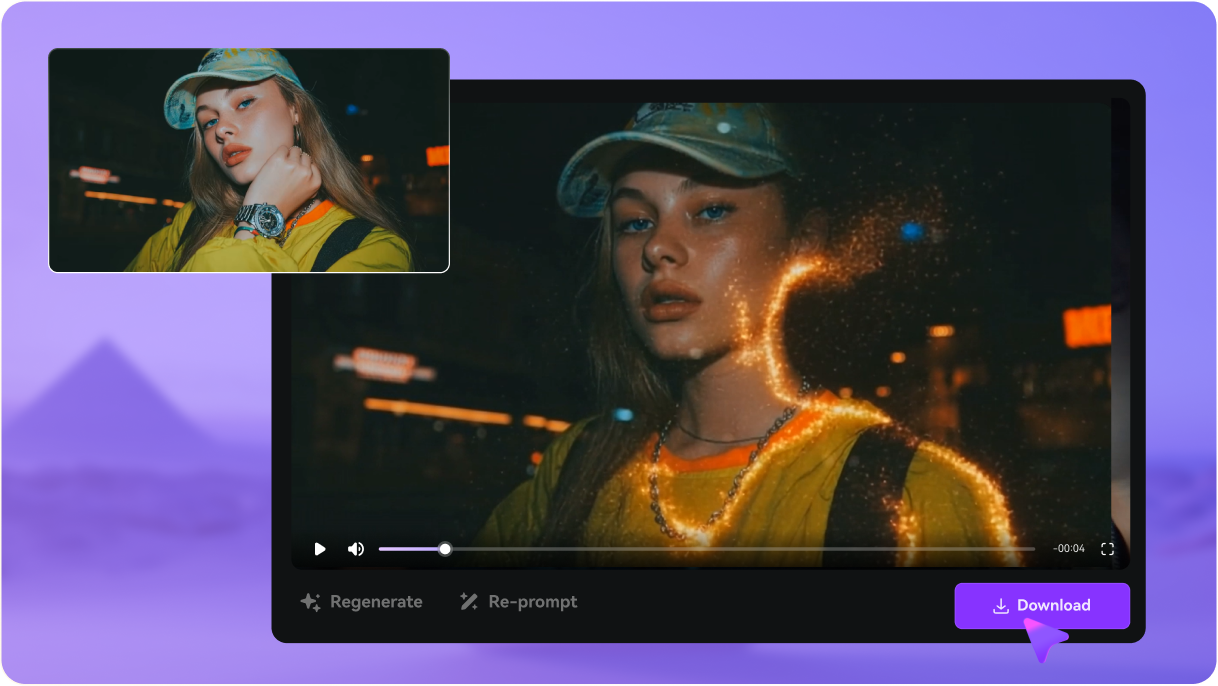
AI Disintegration Video Sample, created with Media.io

Why Choose Media.io for AI Dissolving Particles Video Effect

Turn Yourself into Dust with AI

One-Click Dust Disintegration

Upload a single photo and instantly transform it into a dramatic AI dust dissolve video. No editing skills needed — Media.io automatically creates the cinematic break-apart motion with dust, particles, and smooth dissolve transitions.

Cinematic Particle Effects

Cinematic Particle & Dust Motion

Powered by advanced AI motion models, Media.io produces smooth particle breakup, dust scattering, and flux-style disintegration. Perfect for TikTok edits, emotional scenes, sci-fi transitions, and viral reels.

Cinematic Particle Effects

Powered by Top-Tier AI Video Models

Media.io routes your photo through leading AI video models like Kling, Veo, Sora engines to create smooth, realistic disintegration sequences. Let AI adds cinematic dust, particles, and dissolve motion on top.

Fast and Free AI Dust Effect

Fast, Online & Free to Try

No downloads, no After Effects, no Photoshop. Just upload, apply the AI Disintegration Prompt, and get a stunning HD dust-breakdown video in seconds. Free credits available for new users.

How to Create AI Dust Disintegration Video Online

1
2
3
1
Step 1 — Upload Your Photo

Open the Media.io Image-to-Video Generator and upload your selfie or any photo. The AI analyzes your pose, lighting, and face to create a smooth, cinematic dust dissolve.

2
Step 2 — Apply the Disintegration Prompt

Use our preset AI dissolve prompts or paste your own. Select a video engine, set your aspect ratio, duration and click Generate.

3
Step 3 — Generate & Download

Watch your photo transform into a dramatic disintegration video in seconds Preview the animation and download the MP4 in HD, watermark-free — ready to go viral on TikTok & Reels.

Step 1 — Upload Your Photo
Step 2 — Apply the Disintegration Prompt
Step 3 — Generate & Download

FAQs About AI Disintegration & Dust Effects

1. What is the AI disintegration video effect?

The AI disintegration video effect is a visual animation where a person or object gradually breaks apart into dust, particles, or ash, similar to dramatic dissolve scenes in movies. Media.io uses AI to generate this dust breakup and fade-out motion from a single photo — turning a still image into a cinematic “turn to dust” video without manual VFX editing.

It’s simple: upload your image to Media.io’s AI Image-to-Video tool, choose the dust disintegration effect, and hit Generate. The AI automatically animates your subject breaking into particles — adding motion, drifting dust, and cinematic dissolve timing while keeping your face and silhouette recognizable. No video editing software, green screen, or VFX skills required.

The AI particle disintegration effect is ideal for TikTok edits, Reels transitions, dramatic intros, gaming character edits, cosplay transformations, memorial-style videos, or any moment where you want a surreal “fade into dust” feeling. It’s a quick way to turn ordinary photos into epic, shareable AI VFX-style videos without learning After Effects or complex compositing.

Media.io Online AI Tools Quality Rating:
vote 4.7 (162,357 Votes)